Answers on screen
while they're still asking.
SAGE listens to your interview, works out when a question has actually been asked, and hands you an answer you can say out loud — grounded in your own resume, and hidden from screen sharing on Windows.
13 minutes free · No API key needed, ever
macOS isn’t code-signed yet — right-click the app and choose Open on first launch.
Watch it work
A question, and the answer before they finish
This is the real sequence, at the real speed: the question is picked out of the conversation, and the answer is on screen while the room is still quiet.
In the room
What it looks like mid-interview
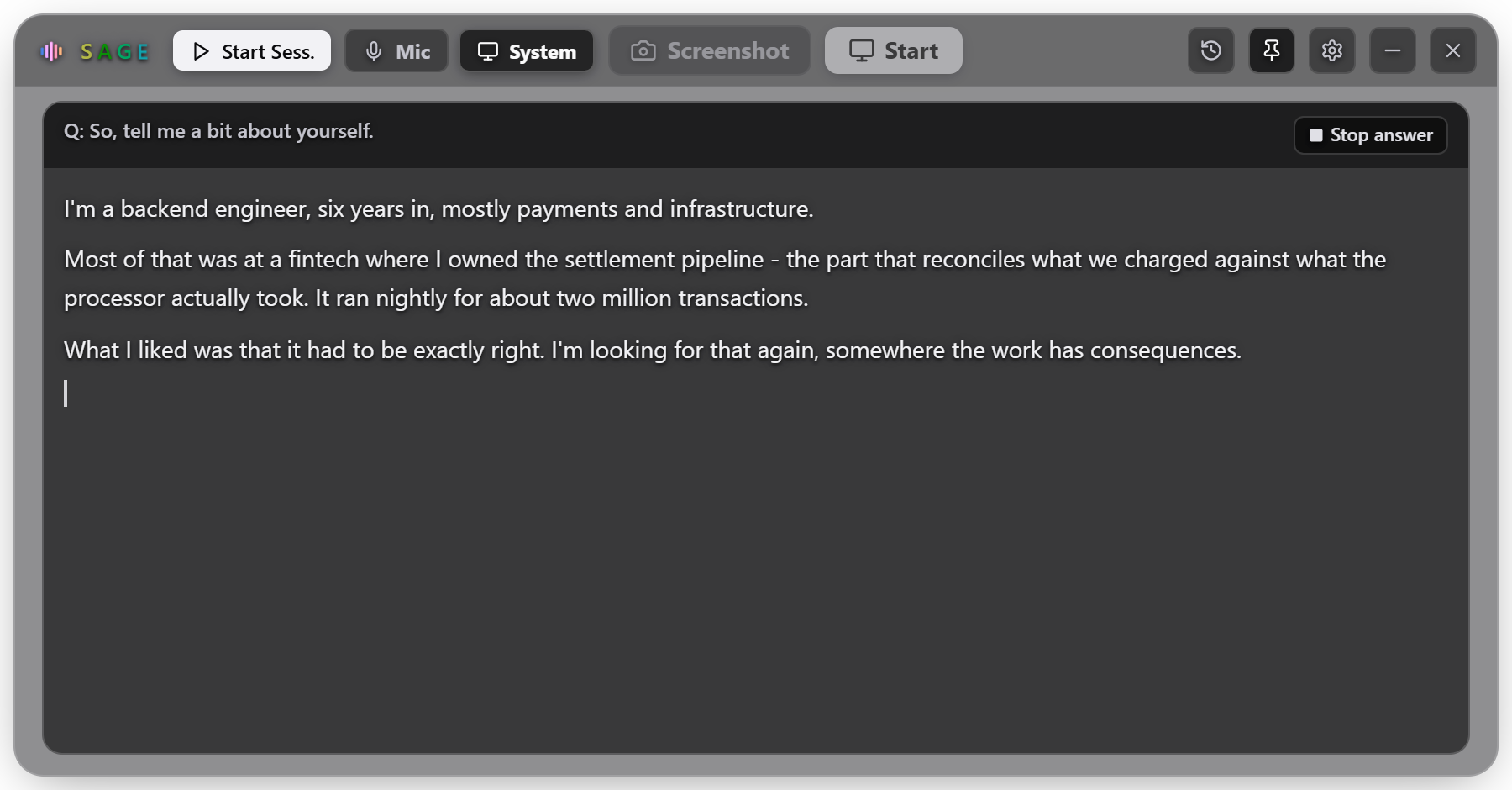
Two things happen while they are still talking: the question is picked out of the conversation, and the answer starts arriving before they finish asking it.
It picks the question out
Small talk, filler and your own voice trigger nothing. When a real question lands it goes up on screen and the answer starts, before the room has gone quiet.
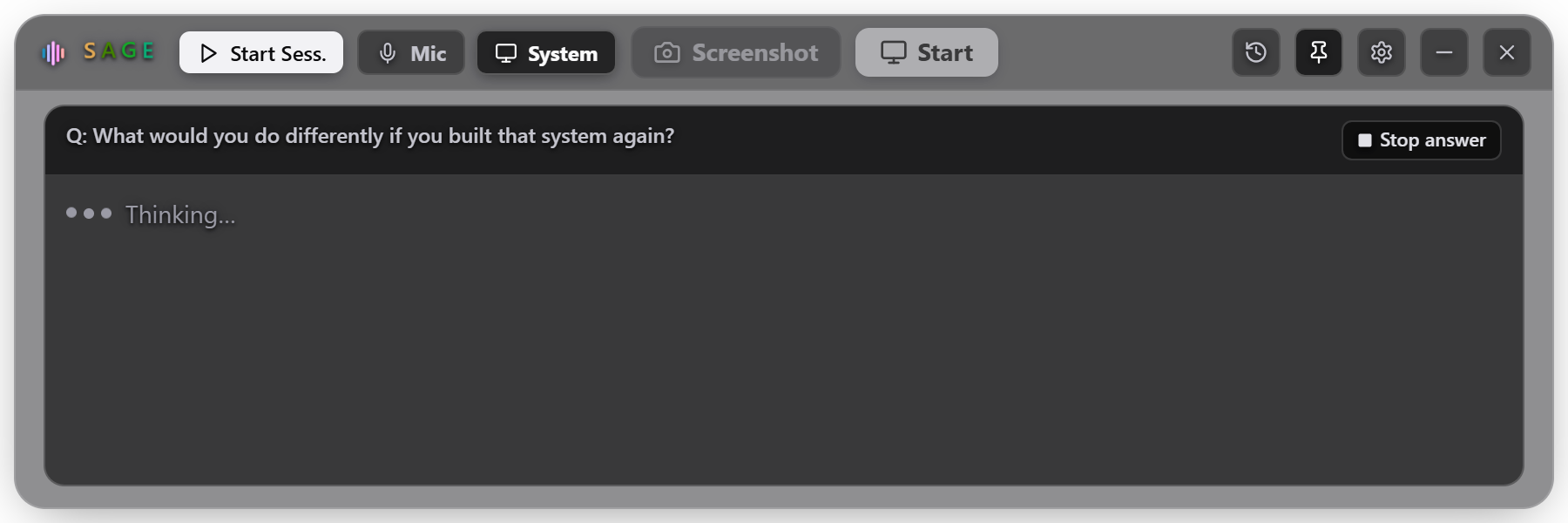
Written the way you would say it
From your own resume, not a generic answer off the internet — your projects, your numbers, in the first person. Streaming word by word so you can start talking.
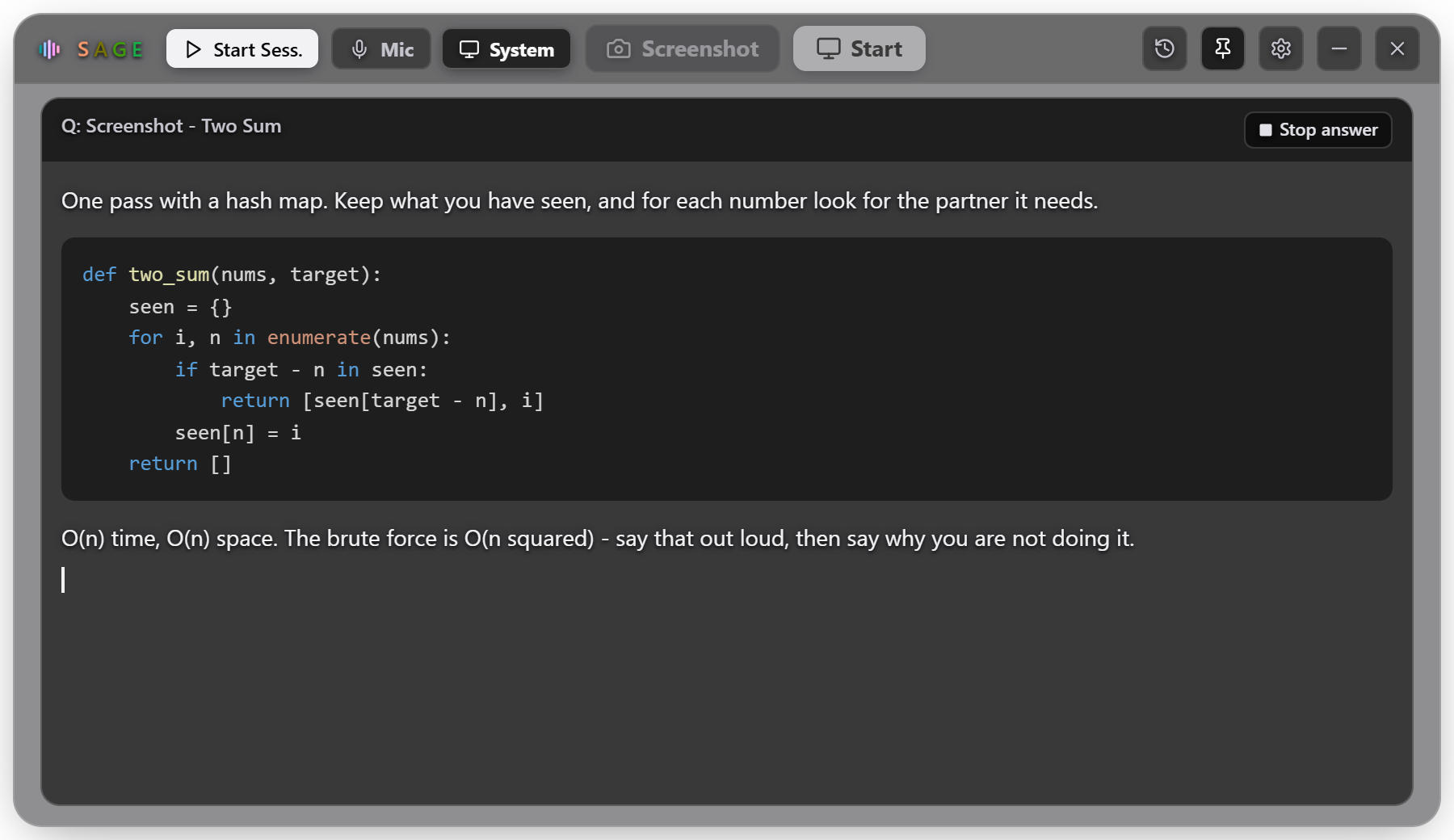
Coding rounds too
Press Screenshot on a shared problem and it reads the screen: a working solution, the complexity, and the thing to say out loud about why.
Screen sharing
On your screen. Not on theirs.
On Windows the window is excluded from screen capture at the operating system level, so it does not appear in Zoom, Teams or Meet — and it stays out of the taskbar and Alt-Tab.
On macOS 15 and later it does appear. Apple removed the mechanism that made this possible, and says there is no public replacement, so we would rather tell you here than let you discover it in an interview. More in the FAQ.
🙈
Nothing.
The window is not in the captured frame.
Windows
Set it up
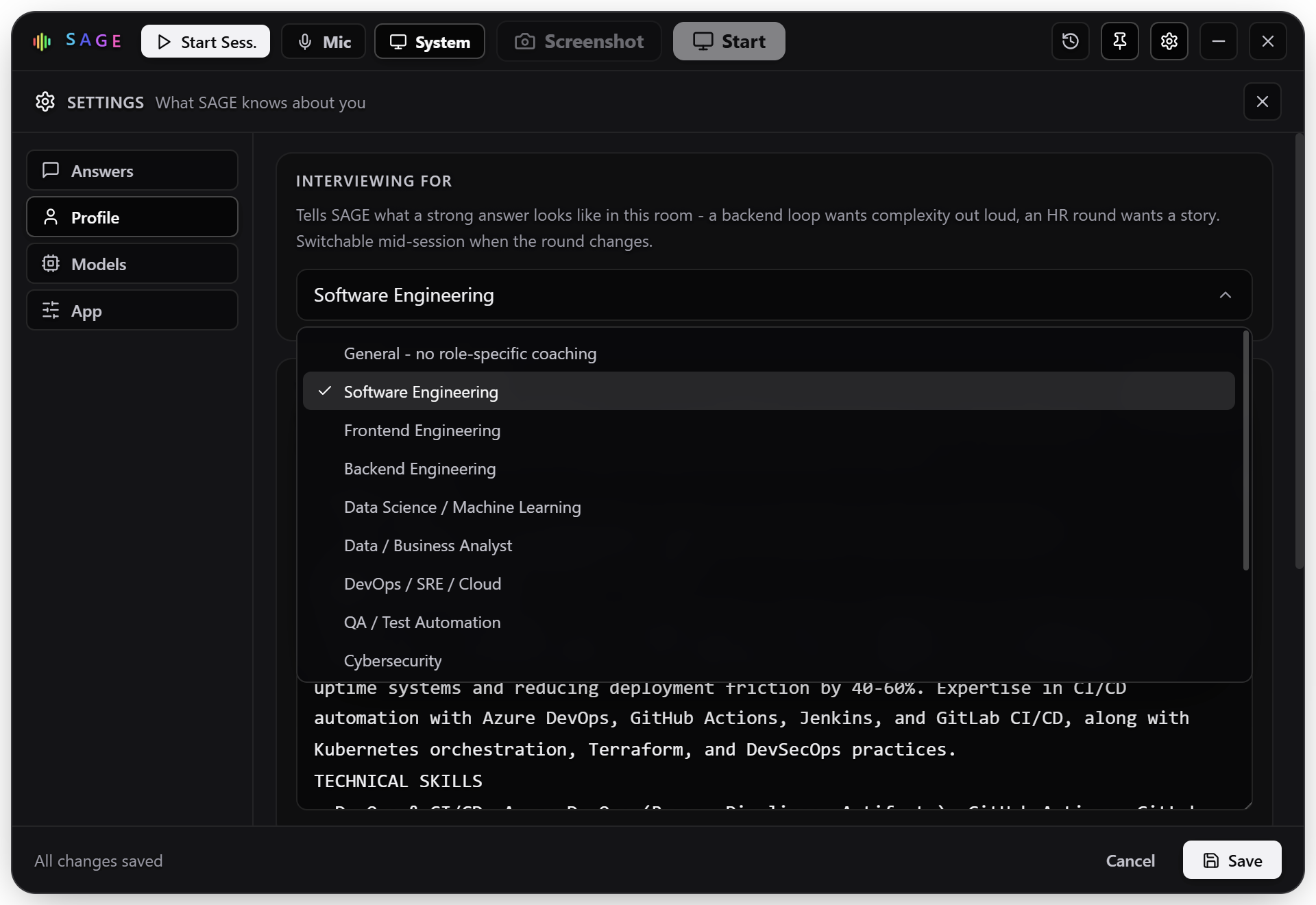
Tuned to the room you are walking into
A backend loop wants complexity said out loud. An HR round wants a story. A design round wants neither. SAGE is told which one this is, and answers accordingly — switchable mid-session when the round changes.
Thirteen roles to pick from
Each one changes what a strong answer looks like: the vocabulary, the level of detail, and what gets said first.
Answer on its own, or when you say
Automatic fires when the speaker goes quiet — hands-free, and nothing to press on camera. Manual waits for Ctrl+Shift+A, which keeps a question asked in three pieces as one question.
Two models, and you choose
Measured on one machine, median of five runs. Luna is both the faster and the stronger of the two here, which is why it is the default.
Features
Details that decide whether it helps
Every one of these exists because the obvious version failed in a real conversation.
One question, one answer
A pause mid-sentence used to split a question into fragments, each answered on its own. SAGE stitches them back together, so it answers what you were actually asked.
It won't invent your CV
Answers are grounded in the resume you provide. Asked about something you have never touched, it says so and pivots to how you would approach it — rather than inventing a project that unravels under follow-up.
Invisible to screen sharing
The window is excluded from capture, so it does not appear in Zoom, Teams or Google Meet — and it stays out of the taskbar and Alt-Tab.
Hears your vocabulary
Your employers and technologies are fed to the recogniser, so Kubernetes, idempotency and your own company name come back spelled correctly instead of as near-homophones.
Screenshot solving
Capture a coding or system-design question on screen and get a worked solution with code and complexity — using a heavier model, because that answer is read, not spoken.
Not just interviews
General mode drops the candidate framing and helps in any live conversation — a meeting, a client call, a class.
Setup
Running in five minutes, buying later
Install
Run the setup file. Windows will warn about an unknown publisher because the installer is not code-signed yet — choose More info → Run anyway.
Start your free trial
Nothing to sign up for and no API key needed. The first 13 minutes run on our account, so you can hear SAGE answer a real question before deciding anything.
Paste in your resume
This matters more than it looks. It grounds every answer and teaches the recogniser your employers and technologies.
Start a session
Allow microphone access, press Start, and talk. Answers appear as questions land.
Activate, when the trial runs out
Settings → Activation, paste the key from your receipt, press Activate. That is the last step — the hours are added to your machine and SAGE carries on exactly as it did during the trial. Nothing else to set up, no OpenAI account, no second bill.
Installing
Downloaded. Now what?
Both builds are unsigned, so both operating systems will warn you once. That is about who signed the file, not what is in it — here is the way past on each.
Windows 10 and 11
- Run sage-setup.exe from your downloads.
- SmartScreen says “Windows protected your PC” and names the publisher as unknown. Click More info, then Run anyway. The Run anyway button only appears after More info, which is what makes this step easy to miss.
- Let the installer finish. SAGE opens on its own.
- Allow microphone access when Windows asks.
macOS Apple Silicon and Intel
- Open the .dmg and drag SAGE into Applications.
- Do not double-click it. Gatekeeper will say the developer cannot be verified and offer only a Cancel button, which looks like the file is broken.
- Instead, right-click SAGE in Applications and choose Open, then confirm. Right-clicking is what turns that dead end into a choice. First launch only.
- Allow the microphone when macOS asks. If you want SAGE to hear the call rather than the room, also allow Screen Recording in System Settings → Privacy & Security, then restart it.
Stuck? Nothing above should take more than a minute. If the app will not open, or it opens and hears nothing, email us and say which operating system you are on — that is usually enough to answer it in one reply.
Questions
Before you download
Is there a Mac or Linux version?
macOS, yes. One universal build runs on both Apple Silicon and Intel — there is nothing to choose between. Windows 10 and 11 are supported as they always were.
Linux is not released. It is possible, and it is not shipped, because it has not been tested properly — and an untested build of something you are relying on mid-interview is worse than no build at all.
One difference worth knowing before you choose: the window is hidden from screen sharing on Windows, and on recent macOS it is not. See Can the interviewer see it? below.
What does it cost to run?
SAGE is free to try for 13 minutes, then hours are $14.99 for three or $17.99 for five. That is the whole cost — transcription and answers run on our account, so there is no OpenAI bill on top and no API key to create. Nothing renews: when the hours run out you decide whether to buy more, and unused hours do not expire. The clock only runs while SAGE is listening, not while a session sits open.
Can the interviewer see it?
On Windows, no. The window is excluded from screen capture at the operating system level, so it does not appear when you share your screen in Zoom, Teams or Google Meet, and it stays out of the taskbar and Alt-Tab.
On macOS 15 (Sequoia) and later, assume it can be seen. Apple changed how screen recording works: every window is composited together before capture, and the setting that used to exclude an app is ignored. Apple has said there is no public way for an application to hide itself. That is not a limitation we can engineer around, so we would rather say it plainly than let you find out during an interview. On earlier macOS the older mechanism still applies.
It has never been able to hide a second monitor, your eyes, or a proctoring tool that photographs your room — and some processes prohibit outside assistance entirely. Use it in line with the rules of whatever you are taking part in.
Where does my data go?
Audio is streamed to OpenAI for transcription and never stored by SAGE. There is no API key of yours involved — transcription and answers run on our account, so there is nothing of that kind to keep. Session logs stay in a local folder. No account, no server, no analytics — there is nowhere for it to be sent, because there is no backend.
Why does my computer warn me when I install it?
Because the app is not code-signed yet. A signing certificate costs money annually on each platform and is on the list; until then both operating systems treat an unknown publisher exactly as they should.
Windows: SmartScreen says the publisher is unknown. Choose More info → Run anyway.
macOS: Gatekeeper says the developer cannot be verified, and double-clicking offers no way past it. Right-click the app and choose Open instead, then confirm. You only do this the first time.
The warning is about who signed the file, not about what is in it. Full steps are in Installing.
Does it answer everything it hears?
No. It filters small talk, filler, background noise and the stock phrases speech models invent during silence, and it only answers what looks like a genuine question. If a transcript is too garbled to be sure, it asks the interviewer to repeat rather than answering something that was never asked.
Pricing
Try it in an interview before you pay
Thirteen minutes on us, with no key and no card. After that you buy hours: $14.99 for three, $17.99 for five. No subscription, nothing renews, and no OpenAI account to set up. The clock only runs while SAGE is actually listening, so leaving it open between questions costs you nothing.
Free trial
13 minutes, once per computer
- Every feature, nothing held back
- No OpenAI account or API key needed
- Runs on our account, not yours
- — 13 minutes of listening time in total
3 hours
3 hours of listening, no subscription
- 3 hours of live listening time
- No OpenAI account or API key needed — ever
- Runs on our account, so there is no second bill
- Buy another key any time; hours stack up
- — About three interviews
5 hours
5 hours of listening, no subscription
- 5 hours of live listening time
- No OpenAI account or API key needed — ever
- Runs on our account, so there is no second bill
- Buy another key any time; hours stack up
- — Two extra hours for $3 more
- — One key activates one computer
Transcription and answers run on our account, so the key is the whole cost — there is no OpenAI bill on top and nothing to configure. Want the source instead? Source licensing starts at $499.99.
Source licensing
Want the code, not just the app?
SAGE ships as a compiled application and the source is not open. If you want to build on it, study it, or ship something of your own from it, licence it properly rather than pulling it apart — you get the real repository, documented, and a person to ask.
Current release
this version, as it stands today
- Full source for the version shipping now
- Modify it for your own use
- 30 days of email support
- — Future versions not included
- — No redistribution or resale
Full source & updates
one-off, includes every future version
- Everything in Current release
- Every future version as it ships
- Use it inside your own product or company
- Unlimited developers on your team
- Priority support and a walkthrough call
Ready when they are
13 minutes free, no key needed. Then buy hours as you use them — no subscription, no OpenAI account, nothing stored.
SAGE is proprietary software distributed as a compiled application. The source is available for licensing — enquiries welcome.